AudioTeleporter
Move your DAW audio anywhere!
A little audio mover for your DAW. Put it on your master bus, send a link, and anyone, anywhere can listen to your session live in their browser. Low latency, lossless if you want it, and they don't have to install a thing :)
Supports all major DAWs


Pricing
Three simple tiers, or buy it once
Start for free! Upgrade when you need more listeners or lossless audio. Pay monthly or yearly (that gets you two months free) and cancel whenever you like. Rather own it? Pay once for a perpetual licence, from €99.
New: Perpetual licences!
Free
Free forever, no card needed.
- 1 listener
- Opus 64 kbps
- Browser playback, no install for listeners
- Adjustable latency
- Lossless (FLAC)
- Password-protected sessions
Basic
More listeners, higher quality.
- 5 listeners
- Opus 256 kbps
- Browser playback, no install for listeners
- Adjustable latency
- Lossless (FLAC)
- Password-protected sessions
- 5 listeners
- Opus 256 kbps
- Browser playback, no install for listeners
- Adjustable latency
- Lossless (FLAC)
- Password-protected sessions
- Pay once, no renewal, free updates
Pro
The full thing: lossless, up to 20 listeners :)
- 20 listeners
- Lossless FLAC, up to 24-bit / 192 kHz
- Browser playback, no install for listeners
- Adjustable latency
- Even lower-latency relay
- Password-protected sessions
- 10 listeners
- Lossless FLAC, up to 24-bit / 192 kHz
- Browser playback, no install for listeners
- Adjustable latency
- Even lower-latency relay
- Password-protected sessions
- Pay once, no renewal, free updates
- 20 listeners
- Lossless FLAC, up to 24-bit / 192 kHz
- Browser playback, no install for listeners
- Adjustable latency
- Even lower-latency relay
- Password-protected sessions
- Pay once, no renewal, free updates
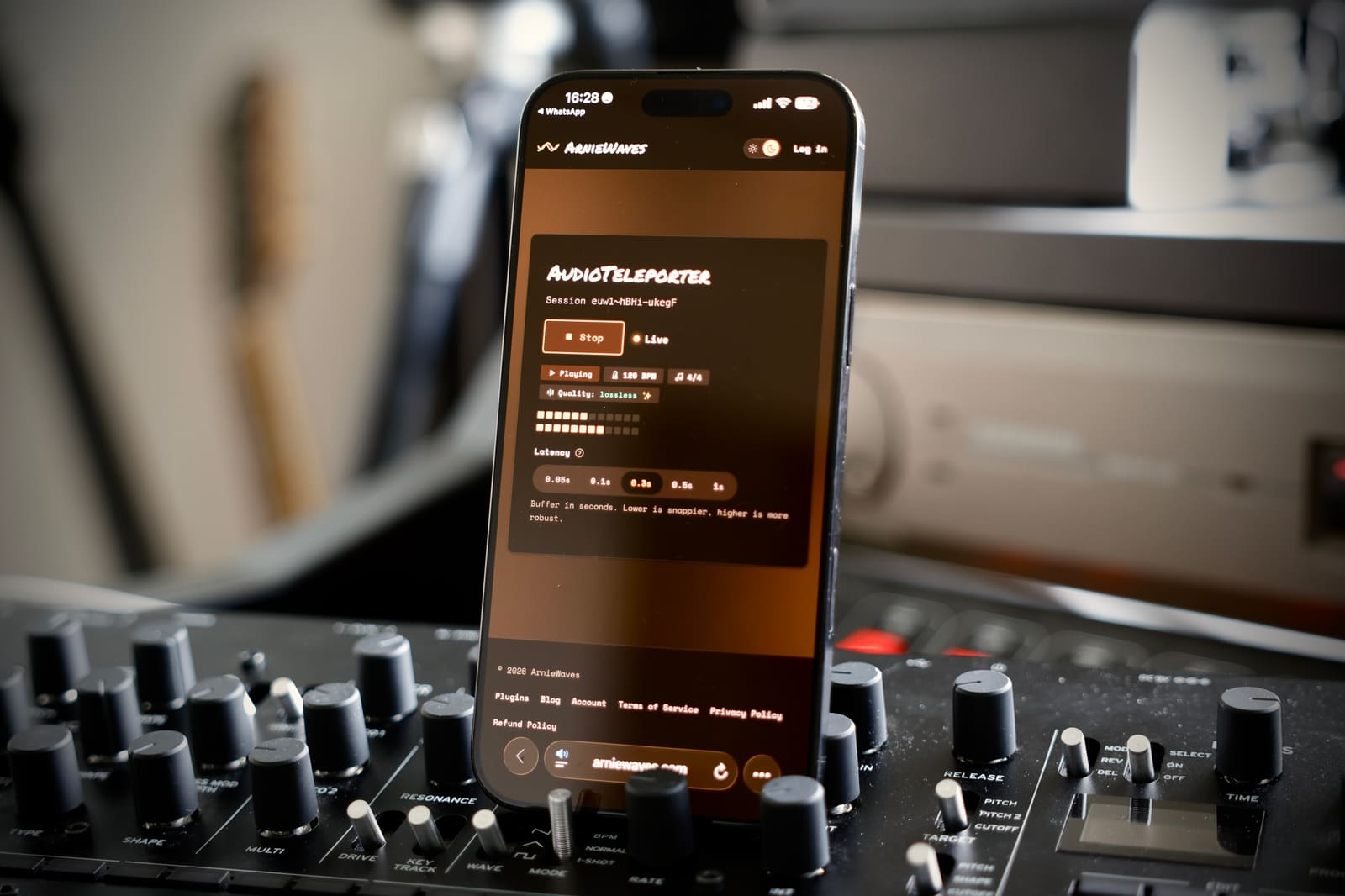
Listen anywhere, on anything
Your listener doesn't need your plug-ins, your setup or an account. They tap the link on whatever's in their hand: a phone on the bus, an iPad on the sofa, a laptop in another studio. You keep working, they keep listening!
How it works
Four steps to move your audio
From your plug-in to someone on the other side of the world. Honestly, it's quicker than bouncing a file!
Drop it on your master bus
Put AudioTeleporter last on your master bus. Or on any bus or stem you want to send! Whatever passes through it is what they hear, after all your processing and the master fader.
Press start and pick a quality
Opus at 64 kbps is fine for a quick check. 256 kbps works for most sessions. And when someone is judging a mix, go lossless FLAC: every bit arrives exactly as it left your DAW.
Send the link
The plug-in gives you a listener link. Paste it in a text, an email, a Slack channel, wherever you like. No upload, no export, no "wait, which version is this?"
They listen in a browser
They click it and they're listening, live! No install, no sign-up, no plug-in. If their connection is a bit wobbly, they can raise their own buffer, anywhere from 50 ms to a full second.
Fair by default
Pricing that respects you
Cancel anytime
Stop whenever you like. No hostage situations :)
A real free tier
A free tier you can actually use, no credit card needed. Try it on a real session first and decide after. No countdown clock!
All your machines
One subscription covers your studio desk and your laptop. License the human, not the device.
Use cases
What people move audio for
It always comes down to this: someone who isn't in the room wants to hear what you're working on. A few favourites:
Download, add to your master bus, log in, stream.
How to uninstall →Remove the plug-in and rescan your DAW.
vs AudioMovers →Lossless audio moving for about half the price.
Why pick AudioTeleporter
- Audiomovers alternativeMove lossless audio to 20 listeners for €5.99/mo.Listento Basic is $12.99/mo and stops at 10.
- SonoBus alternativeYour listeners just open a link in a browser.SonoBus makes every listener install it first.
- Cleanfeed alternativeMoves audio straight off your master bus, losslessly.Cleanfeed has no plugin and is Opus only.
- Sessionwire alternativeLossless FLAC, and 20 listeners for €5.99/mo.Sessionwire charges $9/mo to host a single guest.
- Auxfeed alternativeMoves your audio over the internet on the free tier.Auxfeed's free tier is local Wi-Fi only.
Good to know
Straight answers
Does my listener need an account or a download?
Nope! They open the link in the browser they already have. No sign-up, no plug-in, no app. And listening is always free :)
Which DAWs does it work in?
Anything that loads VST3 on macOS or Windows, plus AU and AAX on macOS. So Logic, Ableton Live, Cubase, Nuendo, Studio One, Reaper, FL Studio, Bitwig, and Pro Tools on macOS are all good!
What can my listeners listen on?
Pretty much anything: a Mac, a Windows PC, an iPhone, an iPad or an Android phone. It's just a web page, so whatever browser is already on there works.
Can my listeners talk back to me?
Not through the plug-in, sorry! AudioTeleporter sends audio one way. Run a phone or video call alongside it when you want to hear them.
What sample rate and bit depth does it stream?
On Pro, lossless streams at your session's own sample rate, anywhere from 44.1 to 192 kHz, at 16-bit, or 24-bit if you switch it on in Settings. Opus runs at 48 kHz. Your listener's browser plays it back at whatever rate their device runs.
Does it support surround or Dolby Atmos?
No, it's stereo only. If you deliver immersive mixes, you'll need something else for that part of the job.
Does it record the session?
Nope, on neither end. It moves audio live and keeps nothing. Want a copy? Just record in your DAW like you normally would.
Is it any good for playing music together in real time?
Sadly no. The internet adds too much delay for tight playing, whatever tool you use. AudioTeleporter is for listening to what you're working on, not for jamming.